Adding your own AI assistant to your website without enterprise costs
Custom RAG solutions like AI chatbots do not have to be expensive. You can run them for free using Cloudflare's generous free tier.
Enterprise platforms like AWS Kendra or Azure AI Search can run into thousands per month, while options like Pinecone's starter tier or self-hosted solutions with pgvector offer more budget-friendly alternatives. After being involved in several RAG projects, I've found that Cloudflare AI Search can be a good option depending on your needs. It won't fit every use case, but for many scenarios it handles most of the heavy lifting.
This post walks through how I built a chatbot for this site using Cloudflare AI Search. I'll cover what RAG is, how AI Search simplifies the pipeline, implementation details (streaming, storage, rate limiting), real costs, and how this scales to business use cases.
While this is a personal site (my digital garden), the same architecture applies whether you're indexing a personal website or company documentation.
What is RAG?
RAG (Retrieval-Augmented Generation) is a pattern that grounds LLM responses in your actual data. Instead of relying solely on the model's training data, RAG retrieves relevant content from your documents and includes it in the prompt.
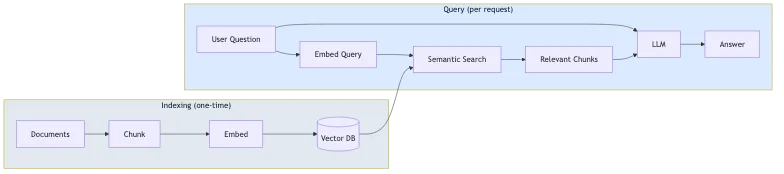
The process has two phases:
- Indexing (one-time): Your documents are split into chunks, converted to vector embeddings, and stored in a vector database
- Query (per request): The user's question is embedded, similar chunks are retrieved via semantic search, and the LLM generates an answer using those chunks as context
This approach reduces hallucinations because the model answers based on your content, not just its general knowledge. It also means you don't need to fine-tune a model every time your content changes.
What Cloudflare AI Search actually does
Before diving into the implementation, it's worth understanding what AI Search (formerly called AutoRAG) provides out of the box:
- Automatic indexing: Point it at your website or data source, and it crawls and indexes your content automatically
- Vector embeddings: It generates and manages the embeddings for semantic search
- RAG pipeline: It retrieves relevant content and generates responses using that context
- Continuous updates: When your content changes, the index updates automatically
This means you don't need to build the chunking, embedding, vector storage, or retrieval logic yourself. AI Search handles all of that.
Architecture overview
Here's what I actually built:
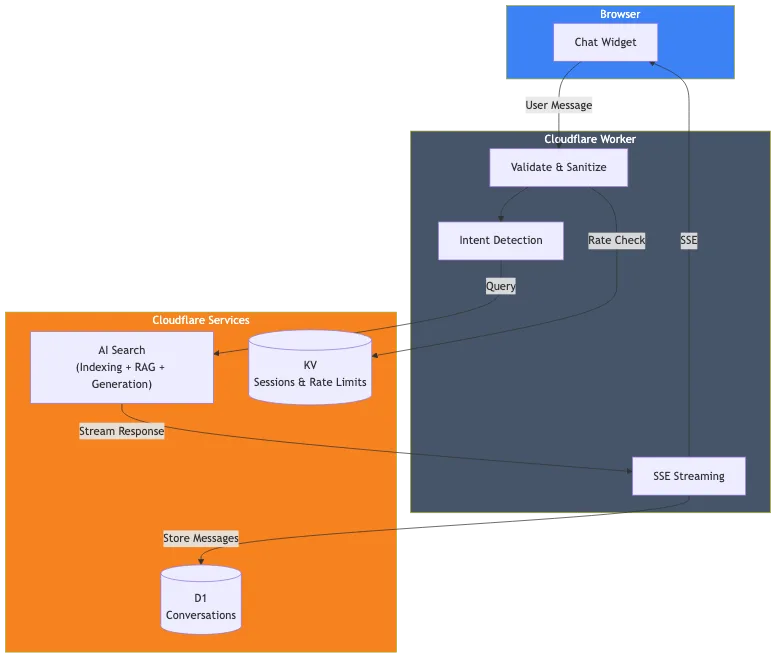
The components are:
- Cloudflare AI Search: Indexes this website and handles the RAG pipeline
- Cloudflare Worker: Handles requests, validation, and streaming responses
- Cloudflare D1: Stores conversation history for analytics
- Cloudflare KV: Manages sessions and rate limiting
The core implementation
The actual AI Search call is straightforward. Here's the key part:
// Get the AI binding from Cloudflare context
const ai = await getCloudflareAI();

// Call AI Search
const aiSearch = ai.autorag('your-ai-search-instance');
const response = await aiSearch.aiSearch({
  query: message,
  system_prompt: systemPrompt,
  max_num_results: 5,
  stream: true
});
That's it for the RAG part. AI Search takes the user's query, searches my indexed website content, retrieves relevant chunks, and generates a response using that context.
Setting up AI Search
To use AI Search, you need to:
- Create an AI Search instance in the Cloudflare dashboard
- Connect your data source (in my case, this website)
- Wait for the initial indexing to complete
- Add the AI binding to your wrangler.toml
# wrangler.toml
[ai]
binding = "AI"
Once configured, AI Search continuously monitors your data source and updates the index when content changes.
The system prompt
The system prompt defines how the AI should behave. This is where you shape the chatbot's personality and boundaries:
function getSystemPrompt(locale: string): string {
  return `You are a helpful AI assistant for [Your Company/Website].

## CRITICAL RULES:

1. ALWAYS respond in ${languageNames[locale]}
2. ONLY answer questions about [your topic] - you are NOT a general-purpose assistant
3. Use the provided context - do not make up information

## Your Behavior:

- Be helpful and professional
- Keep responses concise (2-3 paragraphs max)
- When appropriate, suggest next steps (contact, booking, etc.)
- Don't discuss sensitive topics like pricing - redirect to human contact`;
}
The critical rules section is important. Without explicit boundaries, the chatbot will try to answer general knowledge questions, which may not be what you want.
Streaming responses
Nobody wants to wait for a full response before seeing anything. AI Search supports streaming out of the box with stream: true. You can pipe the response directly to the client using Server-Sent Events (SSE), giving users that familiar ChatGPT-style typing effect.
Storing conversations with D1
If you want to analyze conversations or improve your chatbot over time, you can store them in Cloudflare D1 (their serverless SQLite). Just run the database writes in the background so they don't block the streaming response.
Rate limiting with KV
Public APIs need protection. I use Cloudflare KV for simple rate limiting:
const RATE_LIMIT_WINDOW_MS = 60000; // 1 minute
const RATE_LIMIT_MAX_REQUESTS = 15; // 15 messages per minute

async function checkRateLimit(kv: KVNamespace, sessionId: string): Promise<boolean> {
  const key = `ratelimit_${sessionId}`;
  const data = await kv.get<{ count: number; windowStart: number }>(key, 'json');

  const now = Date.now();
  if (!data || now - data.windowStart >= RATE_LIMIT_WINDOW_MS) {
    // New window
    await kv.put(key, JSON.stringify({ count: 1, windowStart: now }), { expirationTtl: 120 });
    return true;
  }

  if (data.count >= RATE_LIMIT_MAX_REQUESTS) {
    return false; // Rate limited
  }

  await kv.put(key, JSON.stringify({ count: data.count + 1, windowStart: data.windowStart }), { expirationTtl: 120 });
  return true;
}
Local development
For local development, I use npx wrangler dev which runs the Worker locally while connecting to my production Cloudflare services (AI Search, D1, KV). This gives me a production-like environment without deploying:
npx wrangler devThe Worker code runs on my machine, but the bindings connect to the real remote services. This means local development does use your neuron quota, but it's the most accurate way to test before deploying.
What this cost me
Here's the good news: you can run this entire stack on Cloudflare's free tier. No paid plan required.
| Service | Free Tier Limits |
|---|---|
| AI Search | Available on all plans (including free) |
| Workers AI | 10,000 neurons/day |
| D1 | 5M reads/day, 100K writes/day, 5GB storage |
| KV | 100K reads/day, 1K writes/day, 1GB storage |
| Workers | 100K requests/day |
The main limit you'll hit is Workers AI neurons. Let's do the math.
Workers AI (the main cost)
You get 10,000 neurons per day free (about 300,000/month). A typical chat interaction with AI Search uses roughly 500-1,000 neurons depending on response length. That means:
- ~300-600 chat messages per day before exceeding the free tier
- ~9,000-18,000 messages per month included
For most personal sites and small businesses, that's more than enough to run entirely free. Beyond that, you pay $0.011 per 1,000 neurons. A busy chatbot handling 1,000 messages/day would cost roughly $5-10/month extra.
Other services (generous limits)
The other free tier limits are generous:
- Workers requests: 100K/day. That's ~100K chat messages daily before hitting limits.
- D1 reads: 5M/day. Each chat uses a few reads, so thousands of chats daily.
- D1 writes: 100K/day. Each message stores 2 rows, so ~50K messages/day.
- KV reads: 100K/day. Rate limiting uses ~2 reads per message.
For most sites, Workers AI neurons are the only limit you'll realistically approach. The other services have daily limits that reset, giving you plenty of headroom.
What I didn't build
It's worth noting what AI Search handled for me:
- Document chunking: I didn't write any chunking logic
- Embedding generation: AI Search generates and manages embeddings
- Vector storage: No need to set up Vectorize separately
- Retrieval logic: AI Search handles semantic search
- Index updates: Content changes are picked up automatically
If I had built this from scratch with separate embeddings, vector database, and retrieval pipeline, it would have been significantly more work. AI Search abstracts all of that.
Scaling this to business use cases
While I built this for my personal site, the same pattern applies to business scenarios. AI Search supports different data sources beyond websites:
Customer support
Point AI Search at your documentation site, help center, or knowledge base. The chatbot can answer product questions, troubleshooting queries, and policy questions without training a custom model. Add logic to escalate to human agents when needed.
Internal knowledge assistant
Index your company wiki, Confluence, or internal documentation. Employees can ask questions in natural language instead of searching through folders. The system prompt defines access boundaries and response style.
E-commerce product advisor
Index your product catalog pages. Customers can ask "what laptop is good for video editing under $1000" and get answers grounded in your actual inventory. Route purchase-ready customers to checkout.
What changes at scale
The core architecture stays the same. What changes:
- Data source: Instead of a personal website, you connect your business content
- System prompt: Tailored to your brand voice and use case
- Business logic: Custom routing based on user needs
- Rate limits: Adjusted based on expected traffic
- Authentication: Add user auth if indexing private content
AI Search handles the RAG complexity regardless of whether you're indexing 50 pages or 50,000.
Model flexibility
AI Search isn't locked to a single model. You have options:
Generation models: AI Search supports models from multiple providers including Anthropic (Claude 3.5, Claude 4), Google (Gemini 2.5 Flash/Pro), OpenAI (GPT-4o, GPT-5), plus Cerebras, Grok, Groq, and Workers AI. You can select a Smart Default that Cloudflare updates automatically, or choose a specific model. Generation models can even be overridden per-request via the API.
Embedding models: Options include OpenAI's text-embedding-3 models, Google's Gemini Embedding, and Workers AI's BGE models. The embedding model is set during initial setup and can't be changed later (it would require re-indexing everything).
Bring your own model: If the supported models don't fit your needs, you can bring your own generation model through AI Gateway or by using AI Search just for retrieval and sending results to any external LLM.
Limitations
This approach has some constraints:
- Cloudflare-specific: AI Search only works within Cloudflare's ecosystem
- Limited retrieval tuning: You can adjust chunk size and overlap, but not the underlying chunking strategy or retrieval algorithm
- Limited data sources: AI Search supports websites and R2 storage (for PDFs, docs, etc.), but not arbitrary databases or APIs directly
For more complex use cases (custom chunking, multiple heterogeneous data sources, or specialized retrieval), you'd need to build more of the pipeline yourself using Vectorize and Workers AI directly.
Try the chatbot in the corner of this page. It's running exactly what I described here.
If you're building something similar and want to discuss the details, let's talk.