Why I chose Server-Sent Events over WebSockets for streaming AI responses
When I built Kindle-ChatGPT, I needed to stream AI responses to the client in real-time. You know that satisfying experience of watching ChatGPT type out its response word by word? I wanted that same feel.
My first instinct was to reach for WebSockets. It's the go-to solution for real-time communication, right? But after some research, I realized there was a simpler, more elegant solution hiding in plain sight: Server-Sent Events (SSE).
What are Server-Sent Events?
Server-Sent Events is a standard that allows servers to push data to clients over a single HTTP connection. Unlike WebSockets, SSE is unidirectional: the server sends data to the client, but not the other way around.
The protocol is surprisingly simple. The server responds with Content-Type: text/event-stream, and sends data in this format:
data: Hello

data: World

data: {"message": "JSON works too"}
Each message is prefixed with data: and separated by two newlines. That's it. No handshakes, no frame parsing, no connection upgrades.
Why SSE instead of WebSockets?
Here's the thing about streaming AI responses: the client sends a question, and the server streams back the answer. It's fundamentally a one-way flow. Why would I set up bidirectional communication when I only need data going one direction?
WebSockets would work, but they come with overhead:
- Connection upgrade: WebSockets require an HTTP upgrade handshake
- Persistent connection management: You need to handle reconnection logic, heartbeats, and connection state
- Infrastructure complexity: Some proxies and CDNs don't handle WebSockets well
- More code: Both client and server need more complex implementations
SSE, on the other hand:
- Uses standard HTTP: Works through any proxy, CDN, or load balancer that handles HTTP
- Built-in reconnection: The browser's
EventSourceAPI automatically reconnects - Simple protocol: Just text over HTTP
- Native browser support: No libraries needed on the client
For my use case, streaming text from an AI model, SSE was the obvious choice.
How the Gemini API uses SSE
Here's something I didn't initially realize: Google's Gemini API natively supports SSE for streaming responses. You just add ?alt=sse to the endpoint:
const apiUrl = `https://generativelanguage.googleapis.com/v1beta/models/${GEMINI_MODEL}:streamGenerateContent?alt=sse&key=${API_KEY}`;

const response = await fetch(apiUrl, {
  method: 'POST',
  headers: { 'Content-Type': 'application/json' },
  body: JSON.stringify({
    contents: [{ role: 'user', parts: [{ text: userMessage }] }],
    generationConfig: {
      temperature: 0.7,
      maxOutputTokens: 2048,
    },
  }),
});
The API returns a stream of events, each containing a chunk of the response:
data: {"candidates":[{"content":{"parts":[{"text":"Hello"}],"role":"model"}}]}

data: {"candidates":[{"content":{"parts":[{"text":" there"}],"role":"model"}}]}

data: {"candidates":[{"content":{"parts":[{"text":"!"}],"role":"model"}}]}
Building a streaming proxy with TransformStream
My server acts as a proxy between the client and Gemini. But I didn't want to forward the raw Gemini SSE format to the client. The nested JSON structure (candidates[0].content.parts[0].text) is unnecessarily complex for my simple chat interface.
Instead, I used a TransformStream to parse the SSE events and extract just the text:
const transformStream = new TransformStream({
  transform(chunk, controller) {
    const text = new TextDecoder().decode(chunk);
    buffer += text;

    const lines = buffer.split('\n');
    buffer = lines.pop() || ''; // Keep incomplete line in buffer

    for (const line of lines) {
      if (line.startsWith('data: ')) {
        try {
          const json = JSON.parse(line.slice(6));
          const content = json.candidates?.[0]?.content?.parts?.[0]?.text;
          if (content) {
            controller.enqueue(new TextEncoder().encode(content));
          }
        } catch (e) {
          // Handle parse errors gracefully
        }
      }
    }
  },
  flush(controller) {
    // Process any remaining data in the buffer
    if (buffer.startsWith('data: ')) {
      try {
        const json = JSON.parse(buffer.slice(6));
        const content = json.candidates?.[0]?.content?.parts?.[0]?.text;
        if (content) {
          controller.enqueue(new TextEncoder().encode(content));
        }
      } catch (e) {
        // Handle final parse errors
      }
    }
  }
});
There's a subtle but important detail here: SSE events might be split across network chunks. A single data: line might arrive in two pieces. The buffer handles this by keeping incomplete lines until the next chunk arrives.
The client-side implementation
On the client, I could use the native EventSource API. But since my transformed stream sends plain text (not SSE format), I used the ReadableStream API directly:
const response = await fetch('/api/chat', {
  method: 'POST',
  headers: { 'Content-Type': 'application/json' },
  body: JSON.stringify({ message, history }),
});

const reader = response.body?.getReader();
const decoder = new TextDecoder();
let fullMessage = '';

while (true) {
  const { done, value } = await reader.read();
  if (done) break;

  const chunk = decoder.decode(value);
  fullMessage += chunk;

  // Update the UI with the accumulated message
  setMessage(fullMessage);
}
This is the beauty of streaming: each chunk arrives as the AI generates it, and we can update the UI immediately.
Optimizing for e-ink displays
Here's where my specific use case got interesting. Kindle e-ink displays have slow refresh rates. If I updated the UI on every single chunk, the screen would constantly flicker and struggle to keep up.
The solution was throttled updates:
let lastUpdateTime = 0;
const UPDATE_INTERVAL = 500; // Update every 500ms

while (true) {
  const { done, value } = await reader.read();
  if (done) break;

  fullMessage += decoder.decode(value);

  const now = Date.now();
  if (now - lastUpdateTime >= UPDATE_INTERVAL) {
    lastUpdateTime = now;
    setMessage(fullMessage);
  }
}

// Always update with final content
setMessage(fullMessage);
This batches UI updates into 500ms intervals while still receiving data as fast as it arrives. The text accumulates in memory, and the display updates at a pace the e-ink screen can handle.
Error handling and edge cases
Production code needs to handle several edge cases:
1. Network errors mid-stream
try {
  while (true) {
    const { done, value } = await reader.read();
    if (done) break;
    // Process chunk
  }
} catch (error) {
  // Network error occurred
  // Show partial message + error indicator
  setMessage(fullMessage + '\n\n[Connection interrupted]');
}
2. Malformed JSON from the API
The TransformStream's try-catch ensures one bad chunk doesn't break the entire stream. We log the error and continue processing.
3. Empty responses
Sometimes the API returns chunks with no text content. The optional chaining (?.) handles this gracefully.
When to use SSE vs WebSockets
After this experience, here's my mental model:
Use SSE when:
- Data flows primarily from server to client
- You need simple implementation with minimal infrastructure
- Automatic reconnection is valuable
- You're streaming text, logs, notifications, or events
Use WebSockets when:
- You need bidirectional communication
- Low latency is critical (gaming, collaborative editing)
- You're sending binary data
- You need to send frequent messages from client to server
For AI chat applications, SSE hits the sweet spot. The user sends a message (regular POST request), and the AI streams back the response (SSE). Simple, efficient, and it works everywhere.
Deployment considerations
I deployed this on Cloudflare Workers, and SSE worked without any special configuration. The Workers runtime supports streaming responses natively:
return new Response(stream, {
  headers: {
    'Content-Type': 'text/plain; charset=utf-8',
    'Cache-Control': 'no-cache, no-store, must-revalidate',
    'Connection': 'keep-alive',
  },
});
A few things to note:
- No caching: Streaming responses should never be cached
- Keep-alive: Helps maintain the connection for longer streams
- Content-Type: I used
text/plainsince I'm sending raw text, not SSE format
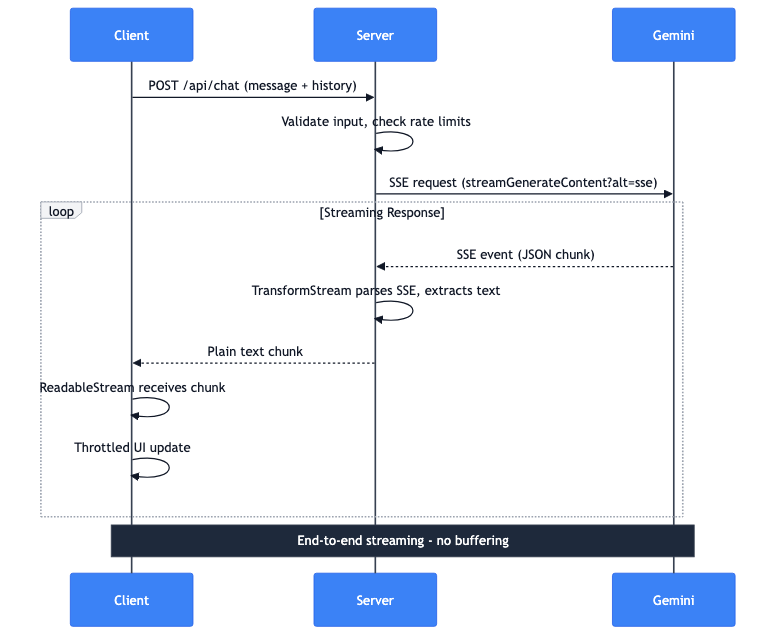
The complete data flow
Let me walk through what happens when a user sends a message:
- Client: POST request with message and conversation history
- Server: Validates input, checks rate limits
- Server: Makes SSE request to Gemini API
- Gemini: Streams back SSE events with JSON chunks
- Server: TransformStream parses SSE, extracts text
- Server: Forwards plain text chunks to client
- Client: ReadableStream receives chunks
- Client: Throttled UI updates display the text
The entire pipeline streams end-to-end. No buffering the complete response on the server. The first token from Gemini reaches the user's screen in milliseconds.